


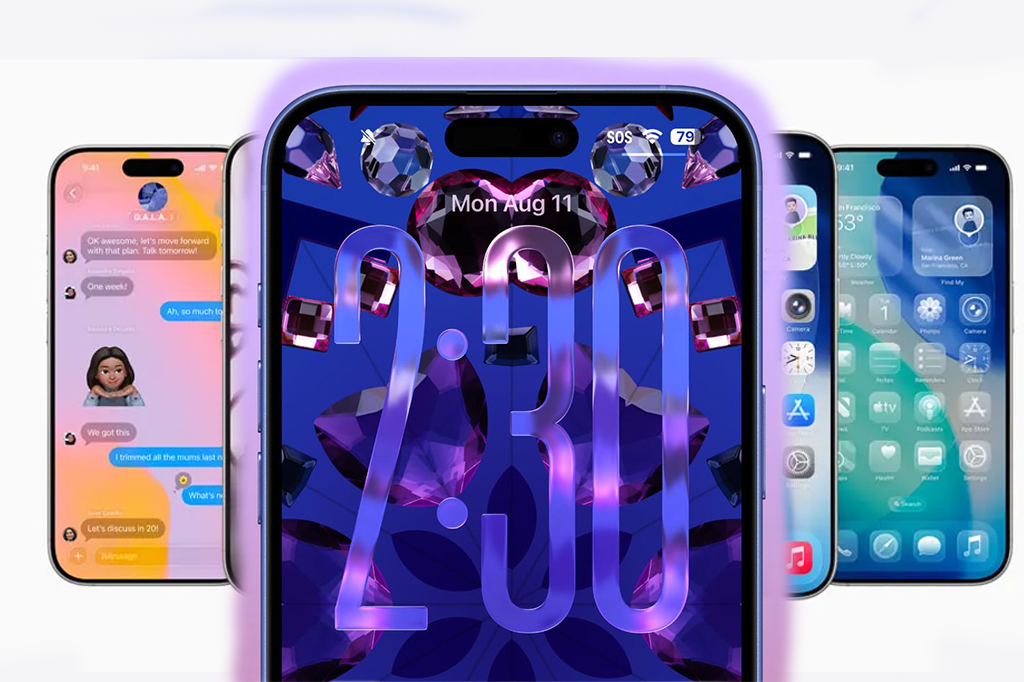
Apple has officially released the sixth developer beta of iOS 26, alongside updates for iPadOS, watchOS, tvOS, macOS, and more. With the public launch of iOS 26 set for September, we’ve now reached the stage where updates are less about dramatic new features and more about refining the details. Still, beta 6 delivers plenty of noteworthy changes that early adopters are buzzing about — from brand-new ringtones to a final decision on Apple’s controversial Camera app changes, and a further polish of the company’s futuristic “Liquid Glass” interface.
So, what’s new in iOS 26 beta 6? Let’s dive in.
🎶 Fresh Ringtones to Refresh Your iPhone’s Sound
One of the biggest surprises in this beta is the addition of six new ringtones. All of them are fresh takes on Apple’s classic “Reflection” tone — the same one that has become instantly recognizable since it launched with the iPhone X.
Among the new additions, “Dreamer” is already going viral on social media. Testers describe it as “hard,” “crazy good,” and even “such a bop.” For a company that rarely touches its ringtone library, this is a surprisingly fun update. In fact, some iPhone owners are saying the new tones may finally tempt them to switch off silent mode.
It might sound like a small change, but Apple knows the emotional pull of sound design. A ringtone isn’t just a notification — it’s an identity marker for the device. By refreshing these tones, Apple is giving users something familiar yet new to look forward to every time their phone rings.
📸 Apple Reverses Course on the Camera App Controversy
Another major headline from beta 6 is Apple’s decision to backtrack on the Camera swipe gesture change that had frustrated many testers.
In earlier betas of iOS 26, Apple changed how users switched between Camera modes (like Photo, Portrait, and Video). The new swipe direction was reversed, clashing with the intuitive behavior people had grown used to for years. Many complained that it broke their “muscle memory,” since no other native Apple app worked this way.
Apple initially offered a compromise in beta 5 with a toggle in Settings that let users revert to the “Classic Mode.” But in beta 6, Apple has taken things further: the toggle has been removed, and the Camera app has been restored to its original behavior.
This move highlights Apple’s long-standing design philosophy: push innovation where possible, but don’t force users into habits that feel unnatural. It’s the same reason why you can still disable “Natural Scrolling” on MacBooks, or move Safari’s address bar back to the top on iPhone. Sometimes, change just isn’t worth the backlash.
⚡ Faster Animations, Smoother Transitions
Beyond ringtones and Camera changes, iOS 26 beta 6 brings new open and close animations for apps, along with noticeably quicker transitions.
These small tweaks add up to make the operating system feel more polished and responsive. For power users who spend hours on their phones every day, these improvements can be just as satisfying as a big new feature. The speed boost also hints that Apple is locking in the final performance optimizations ahead of the official release.
🪟 Liquid Glass: Apple’s Next-Gen Interface Gets More Shine
Perhaps the most ambitious part of iOS 26 is Liquid Glass, Apple’s updated design language. While subtle, the new aesthetic is meant to modernize the iPhone’s look and feel, offering more depth, clarity, and translucency across the system.
In beta 6, Liquid Glass receives further refinements:
-
Richer color dispersion when navigating between app tabs with the magnifying glass-like selector.
-
More “glassiness” in Lock Screen elements and toggle switches.
-
Improved readability in certain areas, balancing style with usability.
This isn’t a radical redesign like iOS 7 was, but more of a gradual evolution — pushing Apple’s clean, futuristic visual identity forward while maintaining the familiar iOS feel. For those who love aesthetic polish, these changes are a big win.
🚀 New Onboarding Experience
After updating to beta 6, users are greeted with a new startup onboarding flow. This walkthrough introduces Liquid Glass, redesigned app interfaces, and the refreshed dark and clear icons that define iOS 26’s updated look.
The onboarding serves two purposes: it highlights what’s new, and it ensures users don’t feel disoriented by the subtle visual shifts. Apple has learned over the years that guiding users through changes helps adoption go much smoother.
🐞 Stability, Bug Fixes, and What’s Next
As with any beta release, bug fixes are included — though new bugs are bound to appear as well. Early testers report that beta 6 feels significantly faster and more stable compared to earlier builds, suggesting that Apple is close to finalizing its public release.
Now that the developer beta is live, public beta testers can expect their own update to roll out soon.
🔮 The Bigger Picture: Why Beta 6 Matters
At first glance, a new set of ringtones or a tweak to swipe gestures might not sound like a game-changer. But these details are exactly what make iOS feel polished, intuitive, and delightful to use. Apple’s attention to the little things — from the sound of a ringtone to the smoothness of an animation — is what separates iOS from its rivals.
Beta 6 may not include groundbreaking features, but it shows Apple’s relentless focus on refinement and user experience. As we approach September, these final touches give us a clear picture of what iOS 26 will bring: a cleaner, faster, and more visually striking operating system.
And if the buzz around “Dreamer” is any indication, don’t be surprised if iOS 26 ends up being remembered as the update that got people talking about ringtones again.
📱 Bottom line: With iOS 26 beta 6, Apple is proving once again that the magic of iOS lies not just in big headline features, but in the thoughtful details. From fresh sounds and smoother animations to UI polish and design clarity, this beta brings Apple one step closer to delivering one of its most refined iOS releases yet.
